You know that feeling when your visual concept is brilliant in your head, but the actual image you produce looks like a corporate training slide from 2004? That was me, three weeks ago, trying to make a funny Instagram post about Monday mornings. The idea was gold. The execution? Let's just say my coffee mug looked like it was rendered by a sleepy potato.
That's when I started messing around with Vizly, and I realized something: making professional-looking art that's actually funny is harder than it sounds. Most AI image generators give you either polished but soulless corporate aesthetic, or chaotic meme energy. Vizly sits in a weird, useful middle ground.
What "Professional Humor" Actually Looks Like
Here's the thing about humor in visual content: if it looks too clean, it reads as sarcastic. If it looks too sloppy, it reads as lazy. The sweet spot is something that feels intentional but not overproduced.
I tested Vizly with a prompt like "a dignified cat wearing a tiny suit, sitting in a boardroom meeting, looking mildly disappointed, editorial photography style". The result wasn't a goofy meme. It was genuinely funny because the cat looked like it genuinely belonged in that boardroom, questioning quarterly projections. The humor came from the contrast, not from exaggeration.
That's the thing. Vizly handles "absurd but believable" really well. The lighting, texture, and composition stay consistent, so the joke lands because the image doesn't break the illusion.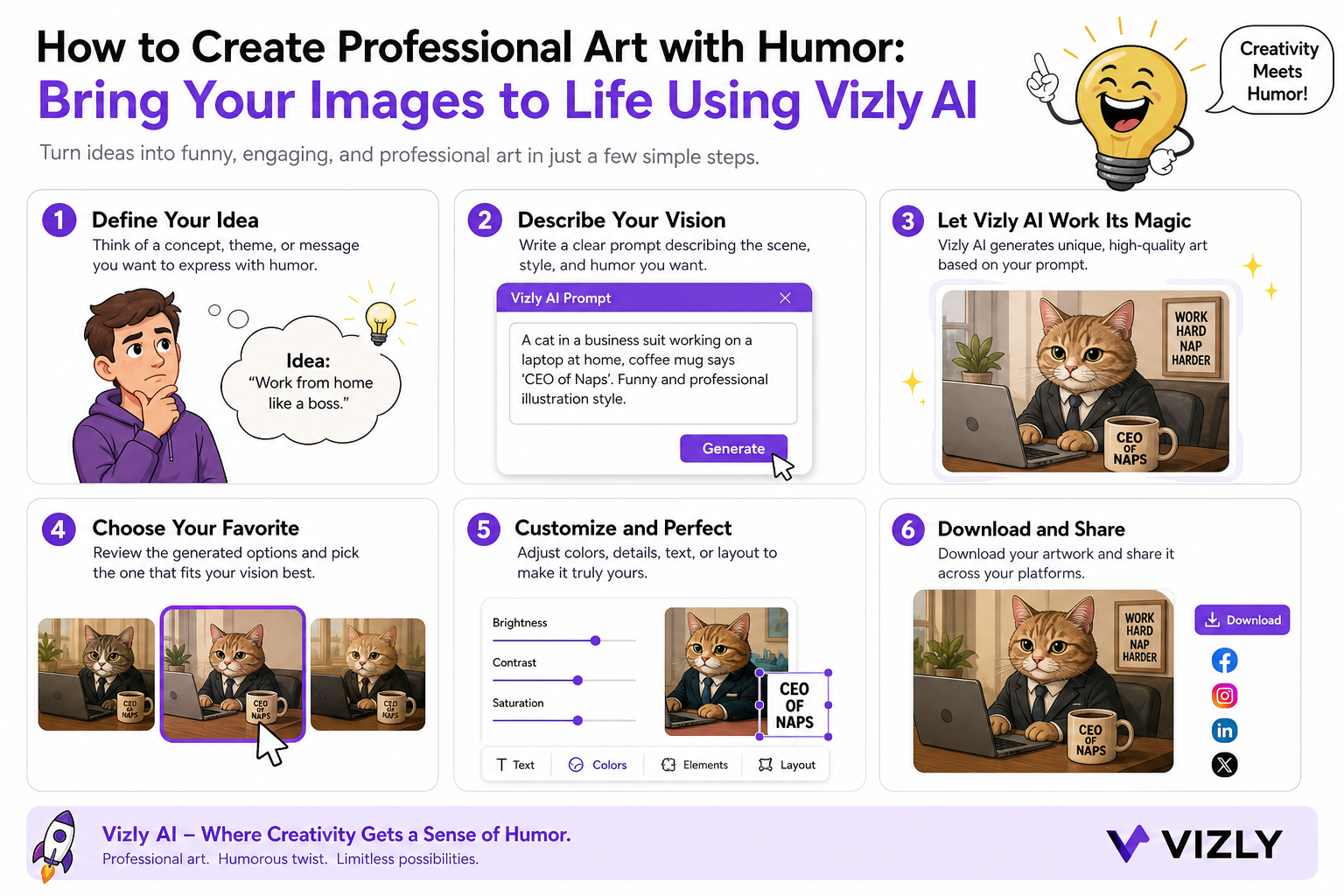
Three Use Cases Where This Actually Matters
Brand social content. A friend runs a small accounting firm and wanted to post something about tax season that wouldn't make people fall asleep. We made an image of a tired raccoon doing paperwork at 3 AM, styled as a legitimate editorial photograph. It looked good enough that clients commented "wait, is this real?" It got shared way more than their usual "don't forget to file" posts.
Newsletter headers and blog features. If you write about tech or productivity, your headers are usually either stock photo misery or abstract gradients. I used Vizly to generate a scene of a stressed office plant watering itself. Sounds dumb. But it perfectly illustrated my point about automation anxiety, and people actually clicked through to read because the image was visually interesting without being a cheap joke.
Just experimenting for fun. Honestly, some of my favorite outputs never got posted anywhere. I made a "serious documentary photo" of a penguin trying to parallel park a tiny car. The realism made it hilarious. I kept it because it made me laugh every time I opened the folder.
The Tradeoffs Nobody Talks About
Vizly isn't the best at everything. If you want cartoonish, exaggerated comedy, it works but it's not its strong suit. The strength is realism and semi-realism. Your prompt needs to describe a scene that would be funny if it were real, not funny because it's absurdly drawn.
Also, facial expressions. Vizly can generate people in funny situations, but if the humor relies on a very specific micro-expression, you'll need to experiment with prompts or accept that the AI might land at "slightly confused" instead of "deadpan sarcasm." That's fine for most use cases, but portrait-level comedic timing is still a human thing.
Another thing: iteration. The first output is rarely the one you use. I ran maybe six variations of that boardroom cat before the expression felt right. That's normal. Don't expect a single prompt to nail your exact comedic vision.
How to Evaluate If This Fits Your Workflow
Ask yourself: does your content need visual humor that respects the viewer's intelligence? If you want memes, go to a meme generator. If you want funny images that you could put on a professional website, a print, or a presentation without feeling embarrassed, Vizly is worth the time.
The prompt strategy matters. Write the scene as if you're describing a real photo to a photographer. Don't write "funny cat." Write "a cat in a business suit, sitting in a minimalist office, stern expression, soft window light." The humor emerges from the realism. That's the trick.
I've been using this approach for about a month now. My slides look less boring, my social posts actually get comments, and I have a folder full of penguins in situations that should not be funny but absolutely are. If you're tired of choosing between "looks professional" and "makes people laugh," this is the weird middle ground you didn't know existed.
Comments
Leave a Comment